
In short
- Give each page one main keyword and one search intent.
- Work in a fixed order: title, headings, content, internal links, then structured data.
- Compare your page with the pages that already rank, and close the gaps.
- Score every page before and after the work, so the result is visible.
Our view
Most on-page work is delivered as a list of changed titles. Nobody records the state of the page before, so nobody can say what the work achieved. We think on-page SEO that is not measured page by page should not be billed as optimization.
What is on-page SEO?
On-page SEO, also called on-site SEO, is everything you change on the page itself to help it rank. Search engines read the title and the headings, then the text, to decide what a page is about. When those elements point at one clear topic, the page can rank for it.
It is one of three parts of SEO. Technical SEO makes sure search engines can reach and index the page, and off-page SEO covers links from other sites. On-page SEO sits between them: the page is reachable, and now it has to deserve its position.
The effort is worth it, because most pages are never found. Ahrefs studied about 14 billion pages and found that 96.55% get no traffic from Google.
Start with one keyword and one intent per page
Before you change a word, decide which search the page should answer. One page targets one main keyword and a few close variations. A page that tries to rank for five different topics usually ranks for none of them.
Then check the search intent by searching for the keyword and looking at what ranks. If the first page is full of guides, a product page will struggle there, and if it is full of product pages, a long guide will struggle. The type of page that ranks tells you what searchers expect.
This step also exposes keyword cannibalization. If two of your pages target the same keyword, they compete with each other, so choose one and merge or redirect the other.
The on-page elements, in working order
1. Title tag
The title tag is the headline shown in search results, and it is the strongest on-page signal you control. Put the main keyword near the start. Keep the title to about 50 to 60 characters, because longer titles are cut off in results. Every page needs its own title.
2. Meta description
The meta description does not affect rankings directly, but it affects whether people click. Describe what the page gives the reader, in about 150 to 160 characters, and include the keyword so it shows in bold when it matches the search.
3. Headings
Use one H1 that states the topic of the page, with H2 headings for the main sections and H3 headings inside them. Headings should describe what the section says, so that a reader who scans only the headings still understands the page.
4. Content
The text has to answer the search fully. Put the direct answer near the top, then add the detail, using the words your buyers use. Cover the questions that the ranking pages cover, and add what they leave out, such as your own data or examples.
5. Internal links
Internal links tell search engines which pages matter and how they relate. Link to a page from other pages on the same topic, with link text that describes the target. A page with no internal links pointing to it is hard to find, for crawlers and for readers.
6. Images
Give each meaningful image an alt text that describes it. Compress images and set their width and height, so the page loads fast and does not jump while loading.
7. URL
Keep the URL short and readable, with the keyword in it. Do not change the URL of a page that already ranks unless you have a strong reason. If you do change it, redirect the old address to the new one.
8. Structured data
Schema markup describes the page in a format search engines read directly. It can earn rich results, such as questions and answers shown under your listing. The markup has to match what is visible on the page.
From our work
For a medical laboratory with a new site, we optimized for rich snippets, so that prices and reviews showed directly in search results. Internal links on every page led toward the booking pages. The site ranked for 566 keywords within three months. See the MedTech case study.
Position decides how many people see that work. In a Backlinko analysis of about 4 million results, the first organic result had an average click-through rate of 27.6%.
Compare your page with the pages that rank
Your page competes with ten specific pages, the ones on the first results page. So the useful question is what those pages have that yours does not.
A TF-IDF analysis answers part of it. It compares the terms on your page with the terms the ranking pages use, and how often they use them, so the result shows terms you are missing and terms you repeat too much. It is a check on coverage, and it does not replace writing for the reader.
Look at structure too. Check how long the ranking pages are and which questions they answer, and note whether they use tables or images. You do not need to copy them, but you do need to cover the subject at least as well.
Measure before and after
This is the step most on-page work skips. Before you change a page, record its state: an audit score for the technical elements, a score for the content against competing pages, and its current rankings. After the work, record the same numbers again.
We do this with a page audit tool, WebSite Auditor from SEO PowerSuite. Each page gets a sheet with the scores before and after. The sheet shows what was changed and whether the page moved.
From our work
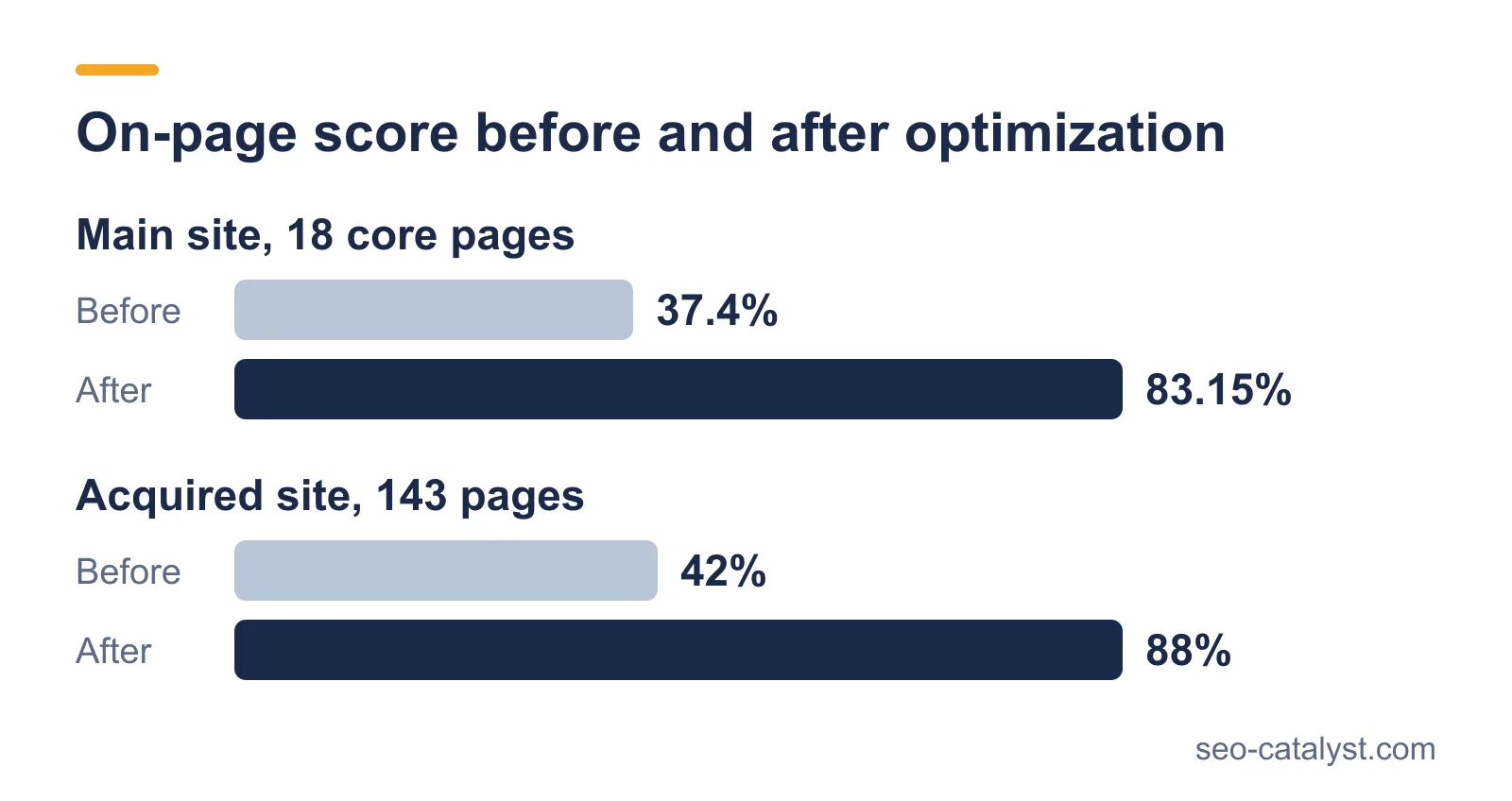
On one site we optimized 143 pages this way. Average on-page scores went from 42% to 88%, and keywords at rank 1 in Google grew from 61 to 352. Keywords in the top 10 went from 239 to 916. The full account is in our EdTech case study.
| Measure | Before the work | After the work |
|---|---|---|
| Technical score of the page | Baseline | After fixes |
| Content score against ranking pages | Baseline | After the rewrite |
| Position for the main keyword | Starting position | Position after 4 to 8 weeks |
| Clicks from search | Last 28 days | Same period after the change |
In what order to optimize pages
You cannot optimize every page at once, so the order matters. We rank pages by relevance to the business and by current traffic, and we also check how recently each page was updated.
Pages that rank on the second results page are often the best place to start. They are close to the first page, so a modest improvement brings visible traffic. Pages that bring leads come before pages that only bring visits.
From our work
After a failed migration, we optimized 18 core pages on the main site of an EdTech company. On-page scores rose from 37.4% to 83.15%, and the site won 267 keywords in the top 20. The pages were chosen for their value to the business, not for how easy they were to fix.
Common on-page mistakes
- The same title on several pages. Search engines cannot tell the pages apart, and neither can searchers.
- Keyword stuffing. Repeating a keyword does not help, and it makes the text harder to read.
- Several pages for one keyword. They split the signals and compete with each other.
- Headings used for styling. A heading that says "Welcome" tells search engines nothing.
- No internal links. A page that nothing links to looks unimportant.
- No measurement. Without a baseline, you cannot tell which changes worked.
On-page SEO checklist
- One main keyword and one intent chosen for the page.
- No other page on the site targets the same keyword.
- Title tag with the keyword near the start, about 50 to 60 characters.
- Meta description that states what the reader gets.
- One H1, with H2 and H3 headings that describe each section.
- The direct answer near the top of the text.
- Terms and questions from the ranking pages are covered.
- Internal links to the page from related pages, and from the page to them.
- Alt text on images, with images compressed.
- Schema markup that matches the visible content.
- Scores and rankings recorded before and after.
On-page SEO and AI search
AI Overviews and AI assistants quote pages that state an answer plainly. Put a direct answer of two or three sentences under each heading that asks a question. Use real lists and tables, because they are easy to lift into an answer.
The same page can win the ranking and the citation. In one CRM report, visits from AI referrals converted to contacts at 1.37%, about twice the rate of organic search. The volume was small, and the signal is worth watching.
Ahrefs compared 300,000 keywords and found that the top page gets a 34.5% lower click-through rate when an AI Overview is shown. Being the source that is quoted matters more as a result.
Frequently asked questions
What is on-page SEO?
On-page SEO is the work done on a page so that it ranks for the search it should answer. It covers the title tag, the headings, the content, internal links, images and structured data.
What is the difference between on-page and off-page SEO?
On-page SEO is what you change on your own pages, while off-page SEO is what happens on other sites, mainly links to yours and mentions of your brand. A site needs both.
How long does on-page SEO take to work?
Search engines have to crawl the page again and reassess it. Changes often show within four to eight weeks, and competitive keywords take longer.
How often should a page be updated?
When the facts on it change or when it loses rankings, and also when the pages that outrank it cover something yours does not. A yearly review of the important pages is a reasonable minimum.
What is TF-IDF in SEO?
TF-IDF is a way to compare the terms on your page with the terms used by the pages that rank for the same keyword. It shows which relevant terms you are missing and which you use too often.
Does keyword density matter?
Not as a target, because there is no ideal percentage. Use the keyword where it fits naturally, in the title and the H1, plus the first paragraph, and write the rest for the reader.
Related services and pages