
In short
- Most migration damage comes from two causes: missing redirects and wrong indexation rules.
- Map every old URL to a new one before launch, one to one.
- Check on launch day that the noindex tag from staging is gone.
- Do not migrate during the months when your buyers decide.
Our view
Migrations are usually run as design or engineering projects, and SEO is invited in the last week. By then the URL structure is fixed and the redirects are an afterthought. The recovery described in this guide began with decisions made before anyone checked what search engines would see.
What counts as a site migration?
From an SEO point of view, a migration is any change that makes search engines relearn the site. Each type carries its own risk.
| Type | What changes | Main risk |
|---|---|---|
| CMS or platform change | The system behind the site, often the URLs too | New templates create duplicate or missing pages |
| Redesign | Templates and navigation, often content too | Content and internal links are removed |
| URL structure change | The addresses of existing pages | Redirects are missing or wrong |
| Domain change | The whole address of the site | Authority is not passed to the new domain |
| HTTP to HTTPS | The protocol | Mixed versions of the same page |
| Merging or splitting sites | Several sites become one, or one becomes several | Pages are dropped without a redirect |
Why migrations go wrong
Search engines know a site by its URLs. Each URL has a history: its rankings and the links that point to it. When the URL changes without a redirect, that history is lost and the new page starts from zero.
The second cause is indexation, because a new platform generates pages in its own way. It may create an address for every filter combination, or carry a noindex tag over from the staging site. Both are invisible to visitors and very visible to search engines.
From our work
On one migration to a new CMS, each product filter combination became a static URL, and Google indexed 66,517 pages on a site that needed a few hundred. A noindex tag also stayed on the live site for over two weeks. Organic sessions fell from around 65,000 a month to roughly 30,000. The recovery is described in our EdTech case study.
Some loss of traffic after a migration is expected. A migration is also the best chance a site gets to fix its structure and its indexation, because everything is being moved anyway.
From our work
The audits before and after show the scale. In July the old site had 25,373 pages and about 824,000 links in total. After the first migration attempt it had 66,517 pages and 8.8 million links. Audit warnings went from 59,198 to 197,584, with 655 errors, and the site was close to a penalty.
Before launch: the preparation
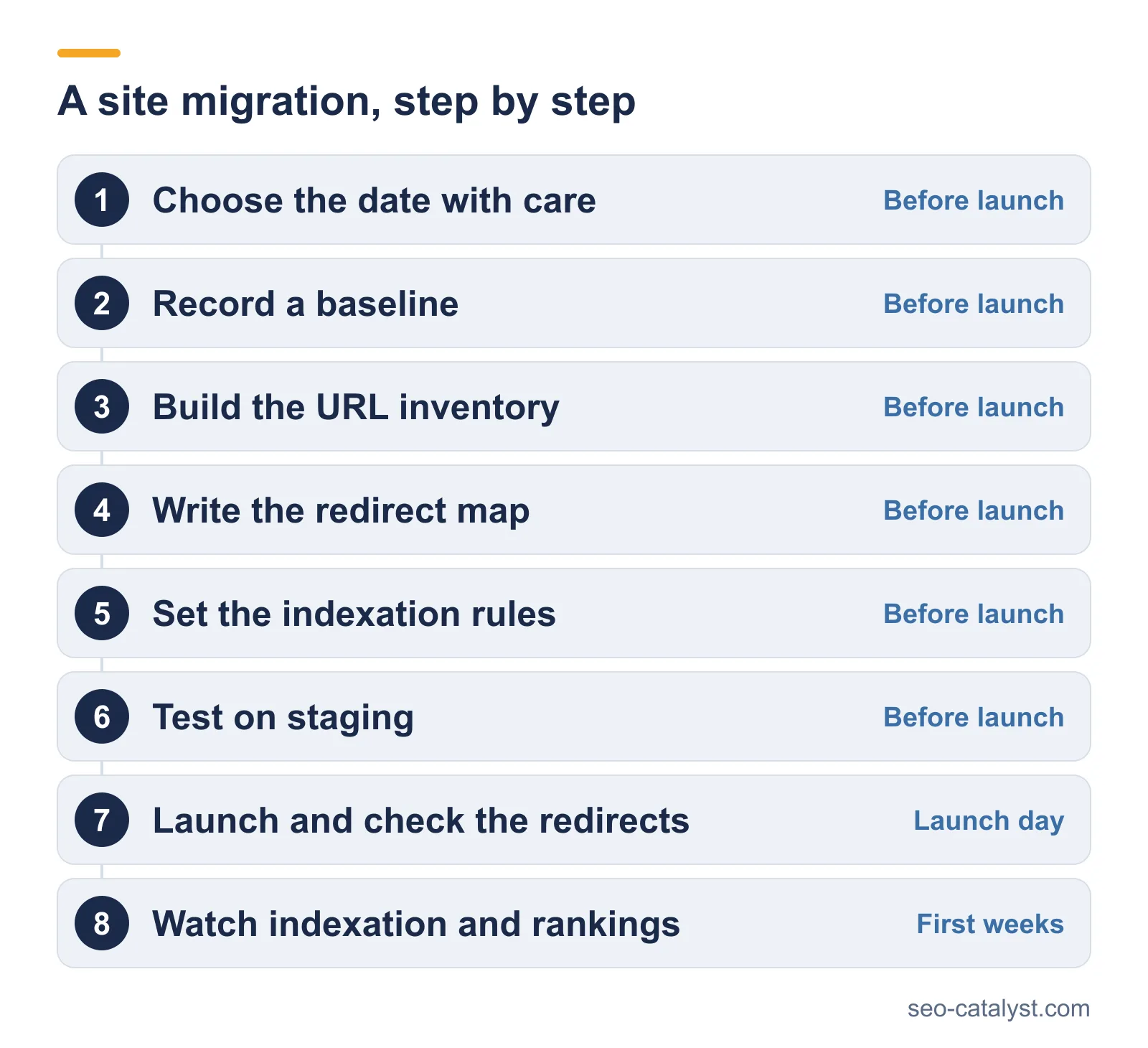
1. Choose the date with care
Even a good migration brings a few weeks of unstable rankings. Do not schedule it in the months when your buyers decide. In the case above, the drop came in June and July, the peak buying season for that company.
2. Record a baseline
Before anything changes, save the current state. You will need it to tell a normal dip from a real problem.
- A full crawl of the old site, with every URL and its title, plus the canonical tag.
- Rankings for your tracked keywords.
- Organic sessions and leads per page, for the last twelve months.
- The list of indexed pages from Google Search Console.
- The pages with the most backlinks.
3. Build the URL inventory
List every URL that has value: pages that get traffic or rank, and pages that have links. Take them from the crawl, from Search Console, from analytics and from a backlink tool. Pages that exist only in one of these sources are the ones that get forgotten.
4. Write the redirect map
For each old URL, name the new URL that replaces it. This is the most important document of the migration.
- Map one to one, to the closest matching page.
- Do not send everything to the home page, because search engines treat that as a missing page.
- Use permanent (301) redirects.
- Avoid chains. If an old redirect already exists, point it at the final address.
- Where a page has no replacement and no value, let it return a 404 or 410.
Agree the URL rules
A migration is the moment to clean up URLs, because they are changing in any case. These are the rules we give a client before the new structure is built.
- Include the parent category in the URL, so the address shows where the page sits.
- Keep URLs under 115 characters.
- Avoid special characters.
- Make each URL descriptive and unique, with no numbered copies of the same address.
We also put every page of the old site into one sheet. Each page is marked for removal or for review by the client's team. Pages that compete for the same search get their own mark, so the overlap is settled before launch. Backlinks are checked in the same pass, because a link to an address that changes is lost unless it is redirected.
5. Set the indexation rules
Decide which pages of the new site should be indexed and which should not. Filters and internal search results need a rule. It can be a canonical tag or a noindex tag, and sometimes a block in robots.txt. Write the rules down before the developers build the templates.
6. Test on staging
The staging site should be closed to search engines, with a password or a noindex tag. Crawl it before launch and check it as if it were live.
- Titles and headings carried over from the old pages.
- Canonical tags that point to the new URLs.
- Internal links that point to new URLs, not to old ones.
- Structured data still present and valid.
- Hreflang tags, if the site has several languages.
- Page speed on the new templates.
- The redirect map, tested against the list of old URLs.
From our work
The company in this case sells to schools. June and July are its peak season, because schools buy before the new academic year. The migration went live in late May, and the drop landed on the two months that matter most.
Launch day
- Remove the noindex tag and any password from the live site. Check several templates, not only the home page.
- Check that robots.txt on the live site does not block the pages that should rank.
- Test the redirects with the full list of old URLs. Each one should return a 301 and land on the right page.
- Crawl the new site and compare the number of pages with the plan.
- Submit the new XML sitemap in Google Search Console.
- For a domain change, use the Change of Address tool in Search Console.
- Check that analytics and conversion tracking record data.
After launch: the first weeks
Watch the site every day for the first two weeks, then every week for the first three months.
- Indexation. The number of indexed pages should move toward the number you planned. A sudden rise means duplicates are being indexed.
- Errors. New 404 pages in Search Console point to redirects that were missed.
- Rankings. Compare tracked keywords with the baseline. Some movement is normal, but a steady fall on many keywords is not.
- Traffic and leads. Compare with the same weeks of the previous year, so that seasonality does not mislead you.
- Server logs. On larger sites, logs show whether search engines are crawling the new URLs or still requesting old ones.
Keep the redirects in place for at least a year. Removing them early throws away the links that still point to old addresses.
From our work
In that recovery, the audit showed 655 errors and 197,584 warnings, and search visibility had fallen from 26% to 11%. We rebuilt the architecture and wrote a new robots.txt, then took the static filter URLs out of the index.
Google's own guidance on site moves is to keep redirects for as long as possible, generally for at least one year.
How to recover from a failed migration
If traffic has already dropped, work in this order.
- Check for a noindex tag or a robots.txt block on the live site. It is the fastest thing to fix and the most damaging to leave.
- Compare the pages indexed now with the pages indexed before. Look for pages that vanished and for thousands of new ones.
- Restore the missing redirects, starting with the pages that had the most traffic and links.
- Remove low-value URLs from the index, with canonical tags and noindex rules, and rebuild the sitemap.
- Ask for the important pages to be crawled again in Search Console.
In the case described above, cutting the index from 66,517 pages to 324 brought organic sessions from roughly 30,000 a month to over 95,000 within 90 days.
From our work
A migration can cost visibility even when the pages move correctly. Two months after one launch on an acquired site of the same company, visibility had slipped from 3% to 2% on a list of 7,642 keywords. In that time 1,023 keywords left the top 50 and 361 improved. Old pages had been removed with their rankings, and the technical fixes found after launch were postponed. The new pages had also gone live before any on-page work.
Migrations and AI search
AI assistants and AI Overviews draw on pages they already know. When URLs change without redirects, those references break in the same way rankings do. Keep the redirects in place, and keep the content that was being cited.
After launch, check that robots.txt on the new platform does not block AI crawlers. New platforms often ship with defaults that nobody reviewed.
Frequently asked questions
What is a site migration in SEO?
A site migration is any change to a website that alters its URLs, structure, platform or domain. Search engines have to relearn the site, so rankings are at risk until they do.
How long does it take to recover after a migration?
A well-planned migration settles in a few weeks. A migration that went wrong can take months, depending on how fast the redirects and indexation rules are corrected.
Will a migration always cause a drop in traffic?
A short period of unstable rankings is normal, but a lasting drop is not. It points to missing redirects or wrong indexation rules, and sometimes to content that was removed.
How long should redirects stay in place?
At least a year, and longer if other sites still link to the old addresses. Removing redirects early loses the value of those links.
What is the most common migration mistake?
Launching with the noindex tag from the staging site still in place. The second is redirecting all old pages to the home page.
When is the best time to migrate a site?
In the quietest months for your business, well away from the season when buyers decide. That leaves time for rankings to settle before the traffic matters most.
Related services and pages