
In short
- Crawling comes before indexation, and indexation comes before rankings.
- Compare the pages a crawler finds with the pages Google has indexed. The gap is your work list.
- Too many indexed pages can hurt as much as too few.
- Check every fix after release. A fix that was deployed is not always a fix that works.
Our view
Audit tools have made technical SEO look like a matter of clearing warnings. Most warnings change nothing. In our experience a handful of causes, usually tied to templates and indexation, explain almost all the damage.
What is technical SEO?
Technical SEO is the part of search engine optimization that deals with how a site is built and served. It covers how search engines discover and render pages, and which version of each page they store.
On a small site, technical problems are rare. On a site with thousands of URLs and a few past redesigns, they add up quietly. Traffic falls slowly, and the cause sits in a redirect rule or a filter setting that nobody has looked at in years.
1. Can search engines crawl the site?
Crawling is the first step, in which a search engine follows links and reads pages. If it cannot reach a page, nothing else matters for that page.
- robots.txt. Check that it does not block pages or folders that should rank. A single wrong line can block the whole site.
- XML sitemap. List only the pages that should rank, and submit the sitemap in Google Search Console.
- Status codes. Pages should return 200. Look for 404 pages that still receive links and for 5xx server errors.
- Internal links. Every important page should be reachable through links, within a few clicks of the home page.
- Server logs. On larger sites, logs show which URLs search engines request. That is often different from what the sitemap says.
On large sites, also look at crawl budget. Search engines spend a limited amount of crawling on each site, so if most of it goes to filters and duplicates, important pages are crawled late.
Google says its crawl budget guidance is meant for very large sites: about a million pages or more, or over 10,000 pages that change every day. On smaller sites, crawling problems usually come from structure. Google also states that robots.txt does not keep a page out of its results, since a blocked page can still be indexed when other sites link to it.
From our work
After one move to a headless CMS, the new site had no robots.txt and no XML sitemap, because the CMS did not create them. We wrote the robots.txt ourselves and raised the sitemap with the developers. Check both files on the day of launch, since a new platform does not always bring them.
2. Are the right pages indexed?
Indexation is the second step. A search engine can crawl a page and still decide not to store it, and only stored pages can appear in results.
Crawl the site with a tool such as Screaming Frog, then compare the list with the pages Google Search Console reports as indexed. The gap between the two lists shows what is missing and what should not be there.
- Noindex tags. Check every template for a noindex tag left by mistake. Staging sites use it, and it is sometimes carried over at launch.
- Canonical tags. Each indexable page should have a canonical tag pointing to itself. Duplicates should point to the main version.
- Duplicate URLs. Parameters and filters can create many addresses for one page. Tracking codes do the same.
- Thin pages. Pages with almost no content weaken the site as a whole. Improve them or merge them, and remove the rest from the index.
From our work
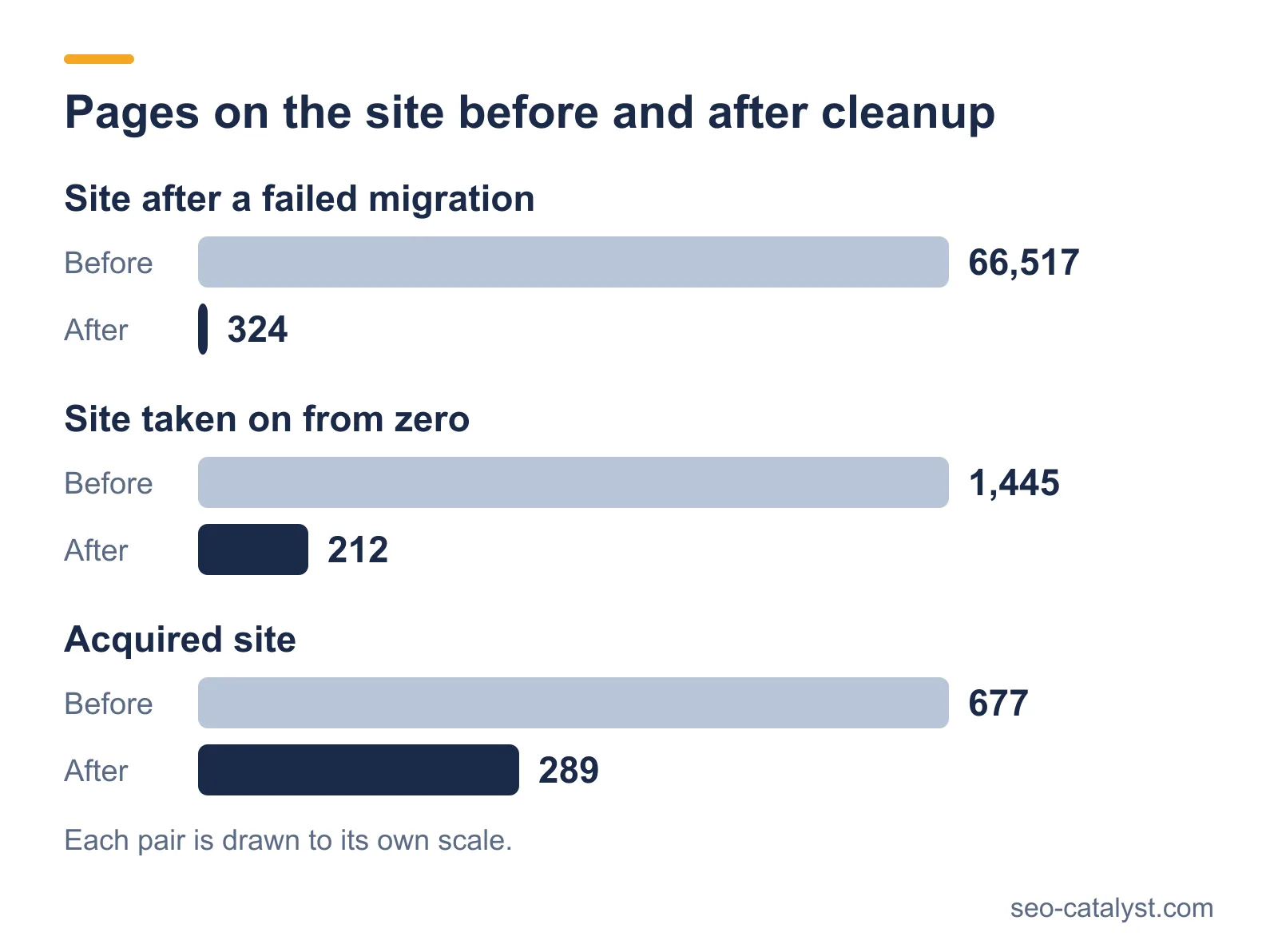
On one site, product filters had turned every filter combination into its own URL. Google had indexed 66,517 pages on a site that needed a few hundred. We cut the index to 324 pages, and organic traffic recovered within 90 days. See the EdTech case study.
3. Do redirects work as they should?
Redirects send visitors and search engines from an old address to a new one. They keep the value a page has earned when its URL changes.
- Use permanent (301) redirects for pages that have moved for good.
- Remove redirect chains, where one redirect leads to another. Point each old URL straight at its final address.
- Fix redirect loops, where two addresses send to each other.
- Update internal links to point at the final address, so they do not pass through a redirect.
- Make sure the site answers on one version only: with HTTPS, and either with or without www.
From our work
In the recovery described above, we fixed 65,490 dynamic URLs and removed 39 redirect chains. Total links on the site had jumped from 824,000 to nearly 9 million after the migration.
4. Is the site architecture clear?
Architecture is how pages are grouped and linked. A clear structure helps search engines understand which page answers which question, and it also spreads the authority of the home page to the pages below it.
- Group pages by topic, with a parent page and the pages that belong under it.
- Keep important pages close to the home page.
- Use breadcrumbs, so the position of each page is visible.
- Find orphan pages, the ones no other page links to, and link to them or remove them.
From our work
This is how we decide what stays in the index. We go through the indexed pages by type and give each type a place in a priority list. Pages with no visits and no visibility come out, along with duplicate versions of existing URLs. On one site this took the index from 677 pages to 289, and the number of pages returning a 4xx error from 113 to 45.
5. Can search engines render the pages?
Some sites build their content in the browser with JavaScript. Search engines can render JavaScript, yet it takes more resources and it sometimes fails. Content that appears only after scripts run may be indexed late or not at all.
Check a page as a search engine sees it, with the URL inspection tool in Search Console. If the main content or the links are missing from the rendered HTML, the page has a rendering problem. Server-side rendering or static generation solves it at the source.
6. Is the site fast and stable?
Google measures the experience of real visitors with Core Web Vitals. There are three measurements, each with a target.
| Measurement | What it shows | Target |
|---|---|---|
| Largest Contentful Paint | How long the main content takes to appear | 2.5 seconds or less |
| Interaction to Next Paint | How fast the page reacts to a click or tap | 200 milliseconds or less |
| Cumulative Layout Shift | How much the layout moves while loading | 0.1 or less |
The usual causes of poor scores are oversized images and scripts that block rendering. Fonts that load late are another. Measure on real templates, with field data from Search Console, and fix the largest cause first.
The targets come from Google's documentation on web.dev. Interaction to Next Paint replaced First Input Delay as a Core Web Vital on 12 March 2024, so an older audit may still report the previous metric.
7. Does the site work on mobile and over HTTPS?
Google indexes the mobile version of a page first, so content that exists only on desktop may be ignored. Check that text and links are the same on both versions, and that the page is usable on a small screen.
The whole site should load over HTTPS, with no images or scripts requested over plain HTTP.
Google confirms that it uses the mobile version of a site for indexing and ranking.
8. Is structured data present and valid?
Schema markup tells search engines what a page describes: an organization, an article, a question with its answer. Add it per template, validate it with Google's Rich Results Test, and make sure it matches the visible content.
9. Do international versions point to each other?
If the site has versions for several languages or countries, hreflang tags tell search engines which version belongs to which audience. Every version has to list all the others and itself. One missing return link can make search engines ignore the whole set.
From our work
On a site we took on from zero, technical work fixed 385 errors and 1,751 warnings, and the site went from 1,445 pages to 212. The aim was a smaller site where every indexed page had a reason to be there.
How to prioritize the fixes
An audit tool can report thousands of warnings, and most of them change nothing. Group the findings by cause, because one wrong template can explain hundreds of warnings and one fix removes them all.
Then order the causes by business impact. A noindex tag on a product page comes before a missing alt text. After each release, crawl again and confirm the result in Search Console.
Technical SEO and AI crawlers
AI assistants use their own crawlers, such as GPTBot and PerplexityBot. Check that robots.txt does not block them, unless you have decided that it should. Many of these crawlers do not run JavaScript, so content that appears only after scripts load may be invisible to them.
Server logs show which AI crawlers visit and which pages they request. Clean HTML with valid structured data serves them and the search engines alike.
Frequently asked questions
What is technical SEO?
Technical SEO is the work that makes a site easy for search engines to crawl and index. It covers robots.txt, sitemaps, redirects, canonical tags, site speed and structured data.
How often should a technical SEO audit be done?
Once a year for a stable site. Audit again before and after a migration or redesign, and after any large unexplained change in organic traffic.
What is the most common technical SEO problem?
Indexation problems. Either important pages are missing from the index, or thousands of low-value pages are in it, and both come from the same causes: filters, parameters, wrong canonical tags and stray noindex tags.
Which tools are used for technical SEO?
A crawler such as Screaming Frog, and Google Search Console for indexation and Core Web Vitals data. On larger sites server logs help as well, and PageSpeed Insights helps with speed.
How long do technical fixes take to show results?
Indexation can change within weeks of a fix. Rankings follow as search engines crawl the corrected pages, and the speed depends on how often the site is crawled.
Do small sites need technical SEO?
Yes, though the list is short. A small site still needs a correct robots.txt, a sitemap, working redirects, HTTPS and pages that load fast.
Related services and pages