
In short
- An audit records where the site stands today, so later work can be measured against it.
- Check crawling and indexation first. Nothing else matters for a page that is not indexed.
- Group findings by cause, because one wrong template can explain hundreds of warnings.
- The output is a roadmap in priority order, not a list of errors.
Our view
Many audits are an export from a crawler with a logo on the cover. The export is the easy part. An audit earns its fee in the last step, when someone decides which five findings matter and in what order.
What is an SEO audit?
An SEO audit is a structured review of how a website performs in search engines. It checks whether pages can be found and indexed, and whether each page targets a search that people make. It also looks at which sites link to the domain.
A website audit is a wider term that can also cover design or conversion, while an SEO audit looks only at what affects search.
What an SEO audit covers
| Part | Question it answers |
|---|---|
| Technical audit | Can search engines reach and index the pages? |
| On-page review | Does each page target a clear search? |
| Keyword research | Which searches matter, and which pages are missing? |
| Competitor analysis | Where are competitors visible and we are not? |
| Backlink audit | Who links to the site, and are any links harmful? |
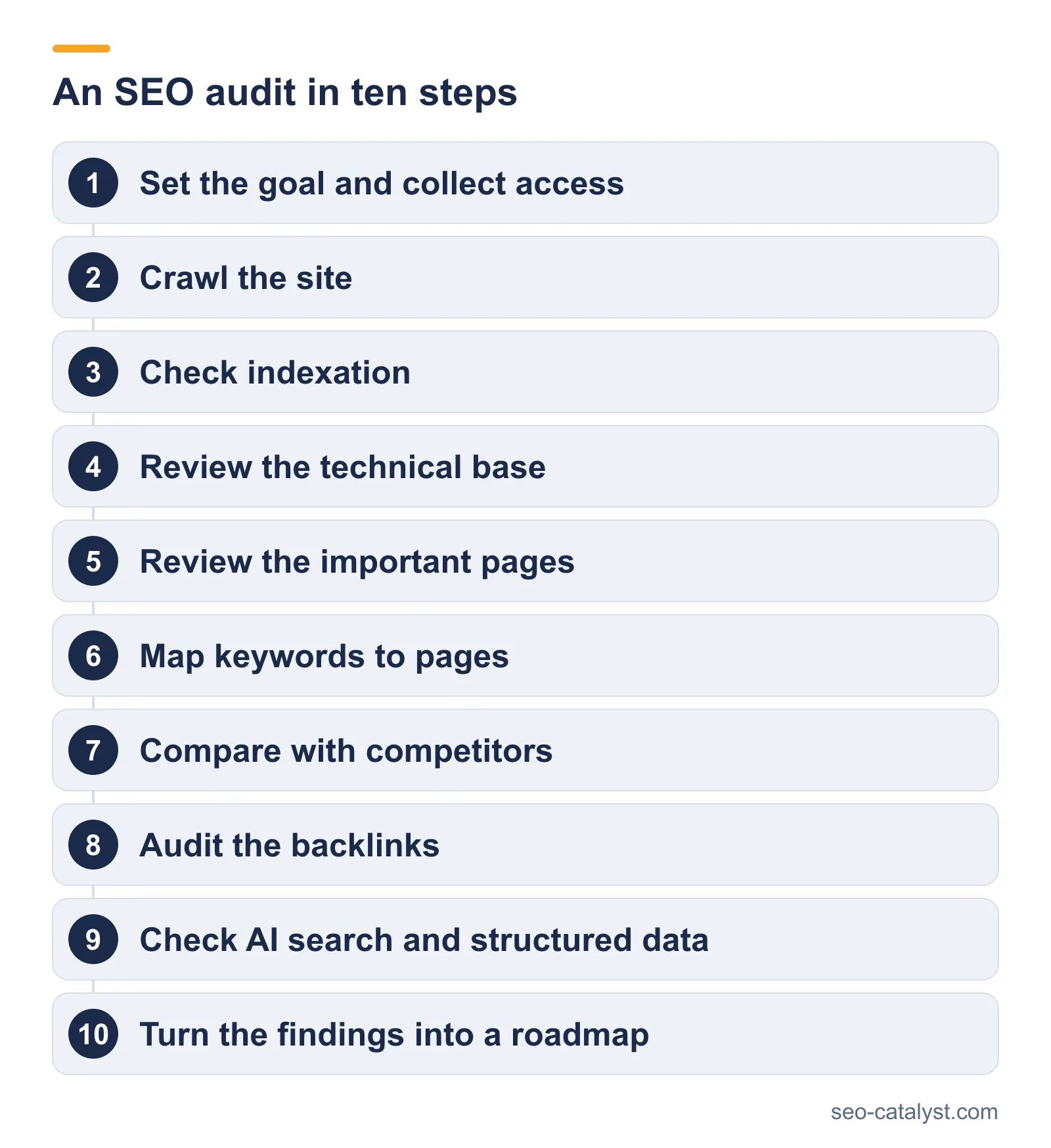
Step 1: set the goal and collect access
Decide what the audit is for, because a site that lost traffic needs a different focus from a site preparing a migration. Then collect read access to Google Search Console and to analytics. On larger sites, ask for server logs too.
Step 2: crawl the site
Run a crawler such as Screaming Frog over the whole site. It follows links the way a search engine does and records every URL with its status code and its canonical tag. This list is the base for every later step.
From our work
Check a finding before it goes to the developers. After a redesign, one crawl reported 1,294 broken images, yet the images displayed correctly and returned a 200 status. The same crawl listed 19 broken links, most of them to government sites that block crawlers. We explained the likely causes in the report, so the real errors stayed at the top of the list.
Step 3: check indexation
Compare the pages the crawler found with the pages Google reports as indexed. Pages that should rank and are missing from the index are the first problem to solve. Thousands of indexed pages that nobody needs are the second.
From our work
In one audit after a failed migration, this comparison showed 66,517 indexed pages on a site that needed a few hundred. Product filters had turned every combination into its own URL. The story is in our EdTech case study.
Indexation comes first for a reason. Across about 14 billion pages studied by Ahrefs, 96.55% got no traffic from Google.
Step 4: review the technical base
Work through the technical checks in order: robots.txt, the XML sitemap, redirects, canonical tags, site speed and structured data. Our technical SEO checklist covers each of them in detail.
Step 5: review the important pages
Take the pages that matter for the business and check each against the search it should answer. Look at the title and the headings, then at the content and the internal links that point to the page. Record a score for each page, so the work can be measured later. See the on-page SEO guide for the method.
Step 6: map keywords to pages
List the searches your buyers make and tie each group of keywords to one page. The map shows which pages are missing and which pages compete with each other. The keyword research guide explains how to build it.
Step 7: compare with competitors
Choose three to five competitors that rank for your main searches. A keyword gap analysis lists the searches where they are visible and you are not. Those gaps become new pages or deeper versions of existing ones.
From our work
For an enterprise cybersecurity company, the audit mapped every technical issue and content gap before any strategy was written. The fixes that followed covered site architecture and the XML sitemap, plus the indexation issues that kept pages out of results. See the cybersecurity case study.
Step 8: audit the backlinks
Pull the list of sites that link to you and sort them by quality. Flag links that could harm the site. Then compare your profile with the same competitors, to see which sites link to them and not to you.
Step 9: check AI search and structured data
Ask the main AI assistants the questions a buyer would ask, and note whether your company is mentioned. Check that schema markup is present and valid, and that AI crawlers are not blocked in robots.txt.
Step 10: turn the findings into a roadmap
This is where most audits fail. A crawler can report thousands of warnings, and a document that lists them all is useless to the person who has to act.
Group the findings by cause first. A missing canonical tag on one template may account for hundreds of pages, and it is one fix. Then order the causes by business impact and by effort.
From our work
On a new site in the health sector, a technical audit found 1,846 issues across 48 pages, including 75 errors and 99 warnings. Grouped by cause, they came down to a short list of fixes that were done before any content work. See the MedTech case study.
| Priority | What belongs here | Example |
|---|---|---|
| Fix now | Anything that blocks indexing of important pages | A noindex tag on a product template |
| Fix next | Problems that affect many pages or revenue pages | Duplicate URLs created by filters |
| Plan | Improvements with clear value and more effort | New pages for missing keyword clusters |
| Leave | Warnings with no effect on search | A missing alt text on a decorative image |
We sort findings into levels before we order them. Errors carry the highest penalty and are fixed first, followed by warnings. Items marked as information carry no penalty and usually wait.
How long an SEO audit takes
Two to four weeks for most B2B sites. The crawl takes hours, and the analysis takes most of the time, because someone has to decide what matters. Sites with several domains or with a large catalog take longer.
Common audit mistakes
- Delivering the tool report. An export from a crawler is data. The audit is the judgment applied to it.
- No priorities. Fifty findings with the same weight get none of them fixed.
- Skipping the baseline. Without scores and rankings recorded at the start, nobody can prove the fixes worked.
- Auditing once. A site changes with every release. Audit again after a migration or a redesign.
Frequently asked questions
What is an SEO audit?
An SEO audit is a structured review of how a website performs in search engines. It covers technical health, on-page content, keywords, competitors and backlinks, and it ends with a list of fixes in priority order.
How do you do an SEO audit?
Crawl the site and compare the crawl with the pages Google has indexed, then review the technical base and the important pages. After that, map keywords to pages and audit the backlinks. Finish by ordering the findings by impact.
How long does an SEO audit take?
Two to four weeks for most B2B sites. Very large sites, or sites with several domains, take longer because the crawl and the analysis take longer.
Which tools are used for an SEO audit?
A crawler such as Screaming Frog and Google Search Console, plus a backlink tool such as Ahrefs. For page-level scoring we use WebSite Auditor from SEO PowerSuite.
How often should a site be audited?
Once a year for a stable site. Audit again before a migration or redesign, and after any large unexplained change in organic traffic.
What is the difference between an SEO audit and a website audit?
A website audit can cover design and conversion as well. An SEO audit looks only at what affects visibility in search engines.
Related services and pages